
Webhooks
Integrate real-time email activity data into your systems with our webhooks feature. Designed for developers and email administrators, this feature provides full control over email event data.

Why use Inboxroad Webhooks
Send the right signals to the right system: fast, filtered, and verifiable.

Real-time signals
Delivered, bounce, complaint, deferral (opens, clicks, unsubscribe optional) sent to your endpoint in seconds.

Granular control
Choose the exact events and sending domains to include — keep noise low, signal high.

Secure by design
HMAC signatures (shared secret) or custom headers (API keys). TLS required.

Ops-friendly
One place to create, enable/disable, and test. Built for developers and email admins.
How it works
Create in minutes: add your HTTPS endpoint, choose events and domains, secure with HMAC or an API key, then fire a test event before going live.
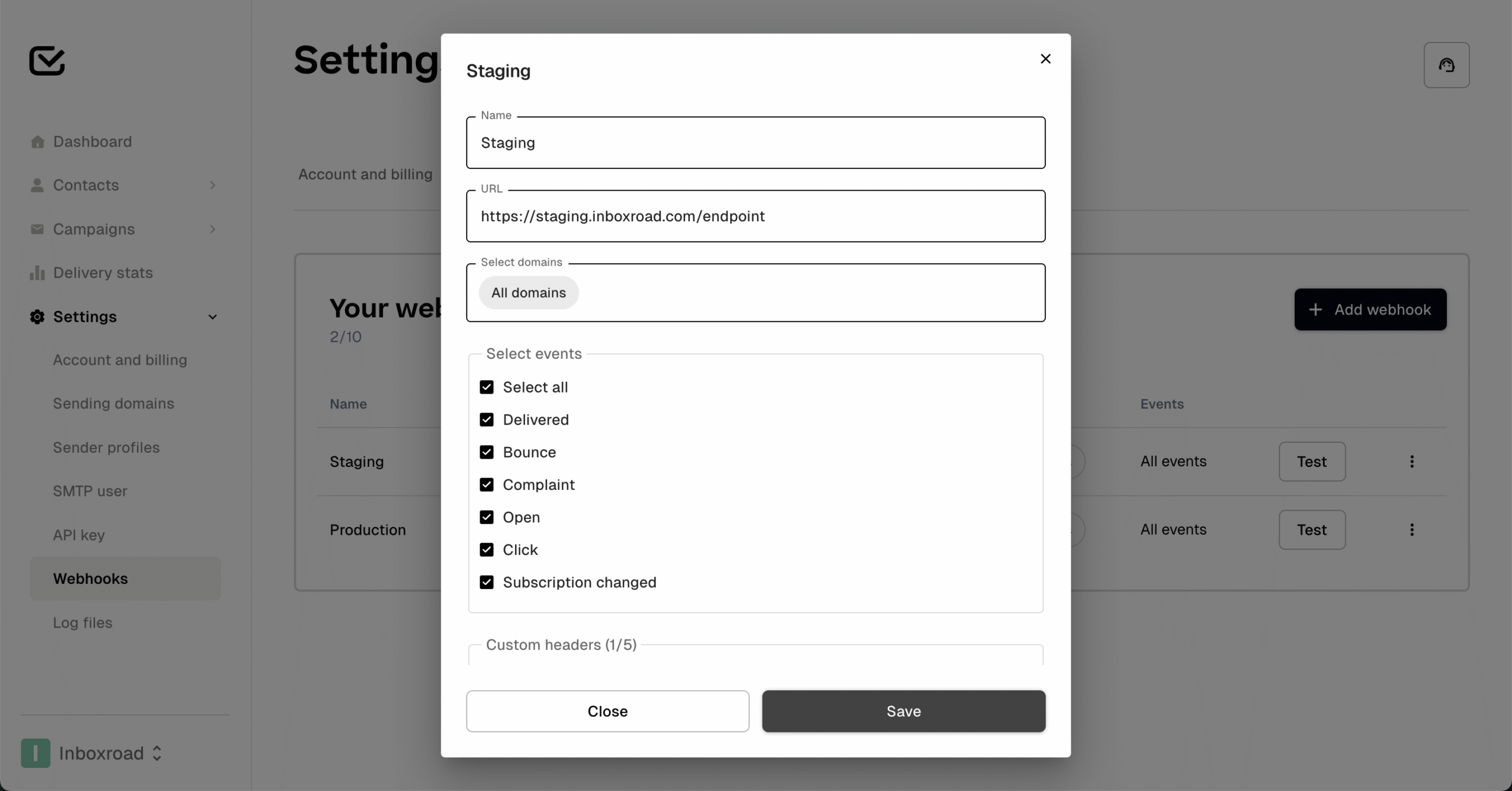
Separate staging, test, and production
Keep environments clean by routing each to its own endpoint.
- Create one webhook per environment (Staging/Test/Prod)
- Scope by domain(s) (e.g., staging.example.com, example.com)
- Add a header like X-Environment: staging|test|prod
- Use Test webhook per environment to verify

Event types (what you can send)
- SMTP stream: delivery, bounce, complaint
- Optional: open, click, unsubscribe, complaints (Email Pro only)
- Default: all events for all domains unless you customise

Custom Headers
Define your own custom HTTP headers for webhook requests. Examples of possible custom headers:
- X-Signature – Add your own HMAC or token for extra security
- X-Event-Source – Mark which system or application triggered the event
- X-Customer-ID – Pass an internal customer or account reference
- X-Trace-ID – Attach a unique ID for debugging or log correlation
- X-Environment – Tag events as coming from staging or production

Security
- HMAC signatures: each request includes a signature header computed from the raw body and your secret (SHA-256)
- API keys: alternatively, validate a key via a custom header you define (e.g., X-API-Key).
- Transport: HTTPS required.

Testing your webhook
You can test your webhook endpoint by sending a sample JSON payload.
- Use curl or a similar tool to POST the JSON to your webhook URL.
- Include fields like event, timestamp, message_id, and recipient.
- Add custom_headers if you want to test user-defined values.
- Example event types: email.delivered, email.bounced, email.complained

Frequently asked questions
Can I send events for just one domain?
Yes. Select one or more domains; default is all.
Do you support multiple webhooks?
Yes — create as many as you need for different systems.
How do I verify HMAC signatures?
Compute sha256(secret, raw_body) and compare to X-IR-Signature. Optionally validate X-IR-Timestamp.
What happens on failure?
We retry with exponential backoff. After repeated failures we mark the webhook degraded and pause; fix the endpoint and re-enable.
Is this compatible with platforms like Mailwizz?
Yes. Post to any HTTPS endpoint that accepts JSON.