Menu
  • Features
    • Sending Services
      • SMTP relay Skip spam, reach inboxes
      • Email API Code-friendly email delivery
      • Dedicated IPs Scale with confidence
    • User intelligence
      • Campaign Statistics Know what works
      • User Engagement Insights that drive action
      • Personalisation Make emails personal
      • Domain Statistics Better decisions with data
      • Webhooks Keep your stack in sync
    • Email Campaigns
      • Email Builder Build with drag-and-drop
      • Contact Lists Manage your audience
      • Templates Design done for you
      • HTML Editor Code your perfect email
    • OTHER
      • Help Center All you need to know to get started
      • API-documentation Set up, tools and documentation
      • Integrations Connect with other tools
  • Pricing
  • Resources
    • Blog
    • Customer Stories
  • About us
  • Contact
Login Sign up

Introduction

  • Set up your account properly
  • How to verify your email address?
  • How to add a sending domain?
  • How to verify your sending domain

Integrations & Tools

  • Webhooks with Power Automate and Other No-Code Tools
  • Inboxroad Webhooks — A Simple Guide
  • Front-end integrations guide
  • EasySendy set up
  • Interspire setup
  • Ongage setup
  • MailWizz setup

Email deliverability

  • Improve your Hotmail delivery with SNDS
  • Google Workspace verification
  • Add “Unsubscribe” button
  • Yahoo feedback loop
  • Google Postmaster Tools
  • Warm-up schedule

List Management

  • Import Contacts

Sending Emails

  • Understanding Bounce Types
  • Personalisation with Smart Tags in Inboxroad Editors
  • Understanding How Replies and Bounces work with Inboxroad
  • Connect through API or SMTP?
  • Sending via SMTP
  • Add “Unsubscribe” button
  • Supported SMTP headers

FAQ

  • Account & Billing
  • Verification of sending domain
  • Deliverability issues
  • Integrations
  • Other
View Categories
  • Help Center
  • EasySendy set up

EasySendy set up

How to connect Inboxroad to EasySendy

In this guide you will learn how to connect Inboxroad to your EasySendy account in a few easy steps. Make sure you have your Inboxroad setup document at hand.

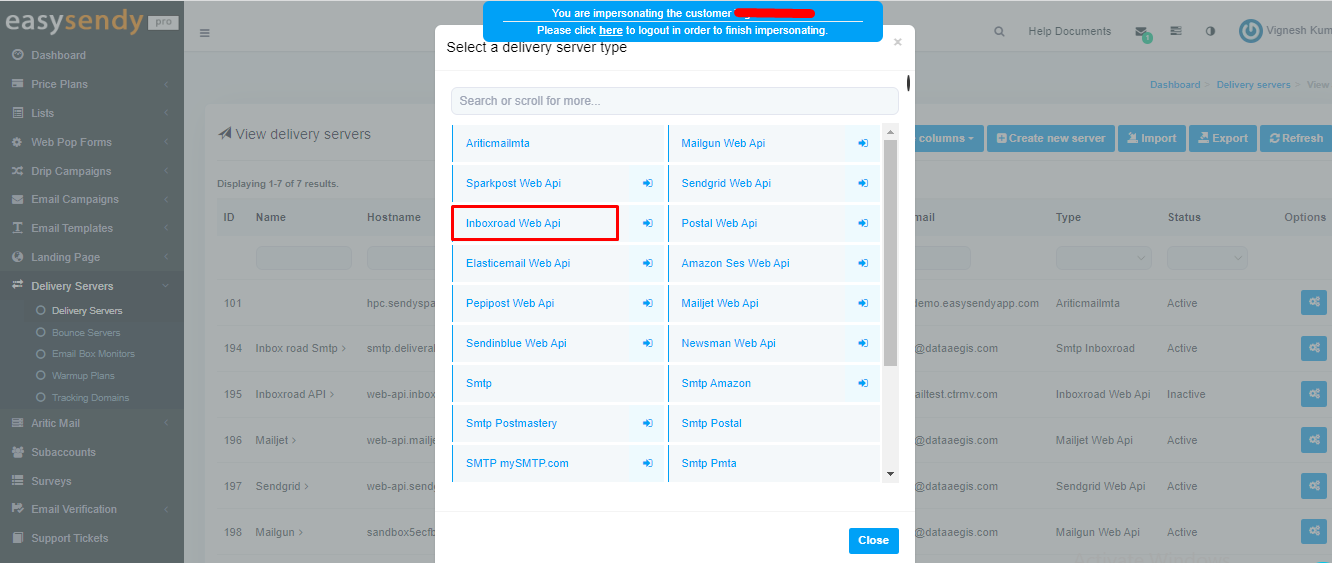
Step 1: Select Inboxroad

  • Go to your EasySendy dashboard, select Delivery Servers and click on Delivery Servers and Create New Server.
  • Select Inboxroad Web api in EasySendy.
Step 2: Insert API Key

  • Go to your Inboxroad Admin > Settings > API key and click on the copy icon.
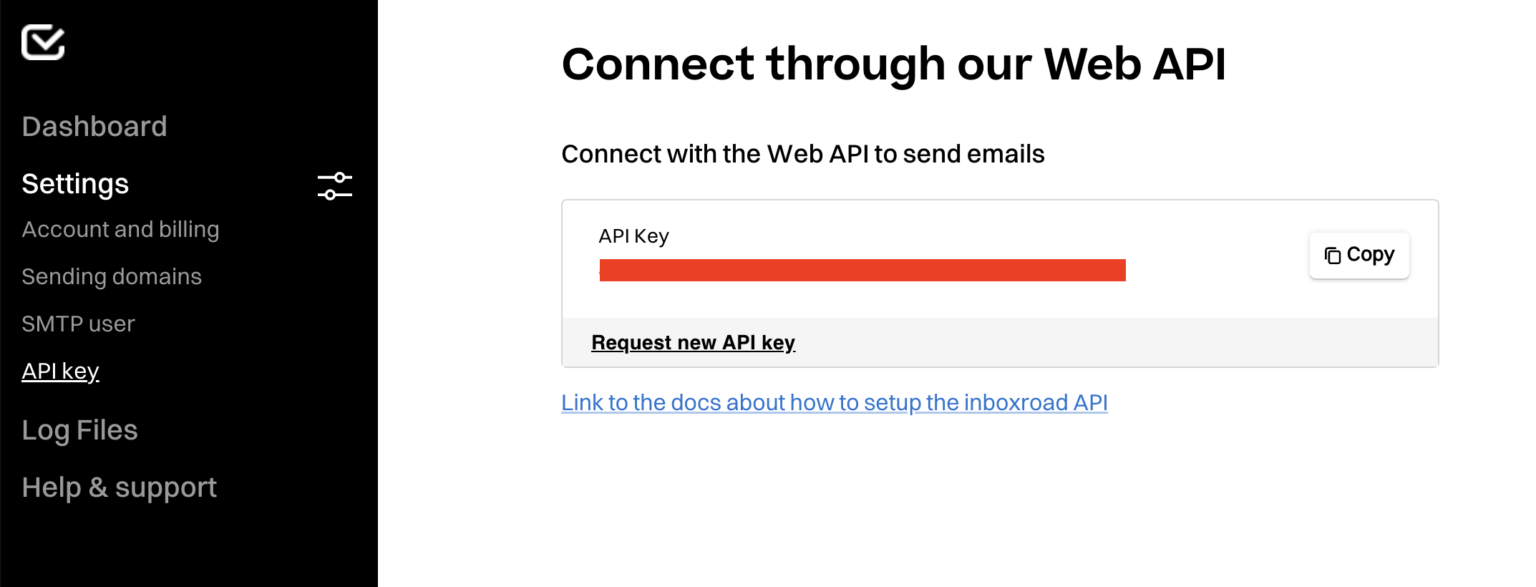
Step 3: Add data

  • Paste the Api key, fill in your From email and click Save changes.

Step 4: Validation

  • Last step is to Validate Delivery Server in your EasySendy Pro account

Happy sending!

Updated on 18 September 2025

What are your Feelings

  • Happy
  • Normal
  • Sad

Share This Article :

  • Facebook
  • X
  • LinkedIn
  • Pinterest
Table of Contents
  • How to connect Inboxroad to EasySendy
inboxroad
EU GDPR COMPLIANT
CAN SPAM ACT COMPLIANT
Sending services
  • SMTP Relay
  • Email API
  • Dedicated IPs
Email design
  • Email builder
  • Contact lists
  • Templates
  • HTML Editor
User Intelligence
  • Campaign statistics
  • User engagement
  • Personalisation
  • Sending statistics
Inboxroad
  • Pricing
  • API docs
  • About us
  • Blog
  • Customer stories
  • All integrations
  • Book a demo
  • Help Center
  • Contact
Terms of service
© 2025 Inboxroad