Menu
  • Features
    • Sending Services
      • SMTP relay Skip spam, reach inboxes
      • Email API Code-friendly email delivery
      • Dedicated IPs Scale with confidence
    • User intelligence
      • Campaign Statistics Know what works
      • User Engagement Insights that drive action
      • Personalisation Make emails personal
      • Domain Statistics Better decisions with data
      • Webhooks Keep your stack in sync
    • Email Campaigns
      • Email Builder Build with drag-and-drop
      • Contact Lists Manage your audience
      • Templates Design done for you
      • HTML Editor Code your perfect email
    • OTHER
      • Help Center All you need to know to get started
      • API-documentation Set up, tools and documentation
      • Integrations Connect with other tools
  • Pricing
  • Resources
    • Blog
    • Customer Stories
  • About us
  • Contact
Login Sign up

Introduction

  • Set up your account properly
  • How to verify your email address?
  • How to add a sending domain?
  • How to verify your sending domain

Integrations & Tools

  • Teamleader integration
  • Webhooks with Power Automate and Other No-Code Tools
  • Inboxroad Webhooks — A Simple Guide
  • Front-end integrations guide
  • EasySendy set up
  • Interspire setup
  • Ongage setup
  • MailWizz setup

Email deliverability

  • Improve your Hotmail delivery with SNDS
  • Google Workspace verification
  • Add “Unsubscribe” button
  • Yahoo feedback loop
  • Google Postmaster Tools
  • Warm-up schedule

List Management

  • Import Contacts

Sending Emails

  • Understanding Bounce Types
  • Personalisation with Smart Tags in Inboxroad Editors
  • Understanding How Replies and Bounces work with Inboxroad
  • Connect through API or SMTP?
  • Sending via SMTP
  • Add “Unsubscribe” button
  • Supported SMTP headers

FAQ

  • Account & Billing
  • Verification of sending domain
  • Deliverability issues
  • Integrations
  • Other
View Categories
  • Help Center
  • Yahoo feedback loop

Yahoo feedback loop

Yahoo offers a Complaint Feedback Loop (CFL) program to help email senders minimize complaint rates. If you participate, Yahoo Mail forwards the complaints sent from your organization. Most ISP FBL’s are IP based which means that inboxroad has already signed up for those FBL’s because we manage your sending IP.
Yahoo is the only ISP that has a domain-based FBL. Yahoo requires two things before signing up for their feedback loop program:

DKIM published on the sending domain and a postmaster@[sending domain] mailbox. If your domain is hosted by Google Apps click here.

Once you have the mailbox, follow these simple steps.

  1. Go to the Yahoo FBL page.
  2. Login with a Yahoo account, or create a new one.
  3. Fill in the form (see example on the right). Make sure to fill out the following:
    – Reporting Email: fbl@deliverabilitymanager.net
    – Selector: dlvm
    – Request type: Add
    – Domain: You should fill in the domain which you are using as your sending domain. So if you are mailing from a subdomain like news.example.com, fill in news.example.com. If not, just fill in the root domain.
  4. Yahoo will send a unique verification code to the postmaster@ address.
    Submit this code in the form to verify.

After this, it can take up to 48 hours before they process it.
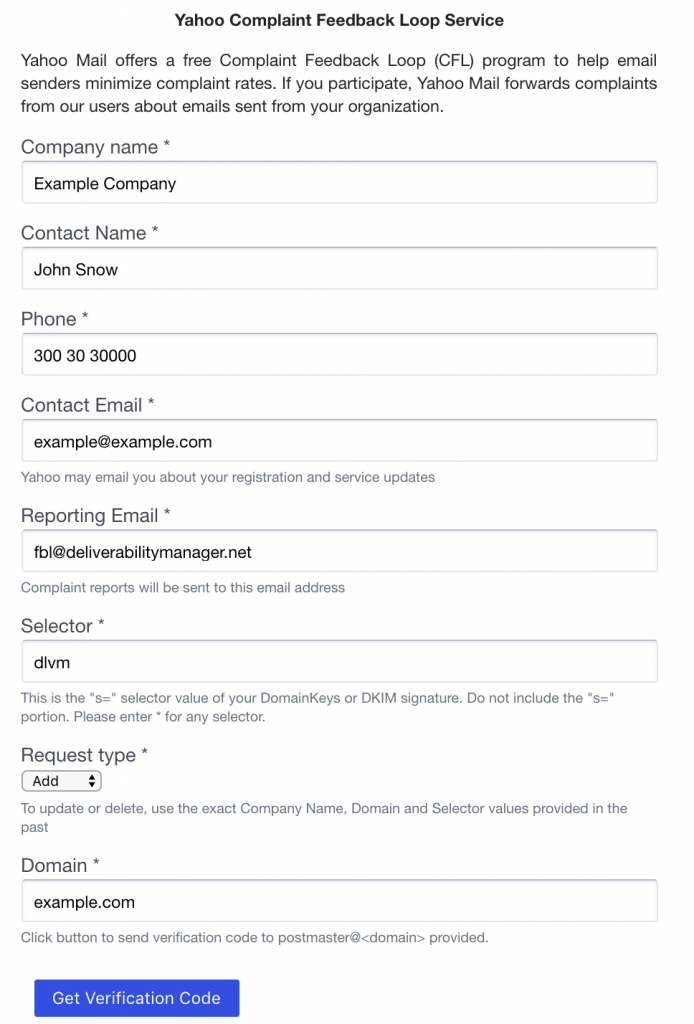
Yahoo_Feedback_Loop

Please contact your account manager if you need any further information.

Updated on 18 September 2025

What are your Feelings

  • Happy
  • Normal
  • Sad

Share This Article :

  • Facebook
  • X
  • LinkedIn
  • Pinterest
inboxroad
EU GDPR COMPLIANT
CAN SPAM ACT COMPLIANT
Sending services
  • SMTP Relay
  • Email API
  • Dedicated IPs
Email design
  • Email builder
  • Contact lists
  • Templates
  • HTML Editor
User Intelligence
  • Campaign statistics
  • User engagement
  • Personalisation
  • Sending statistics
Inboxroad
  • Pricing
  • API docs
  • About us
  • Blog
  • Customer stories
  • All integrations
  • Book a demo
  • Help Center
  • Contact
Terms of service
© 2026 Inboxroad